
Anker SOLIX C300 DC A1726: The No-AC Power Guide
A research-based guide to the C300 DC A1726: what its USB/DC ports can support, how shared limits affect a setup, and when the EcoFlow TRAIL 300 DC is worth comparing.
Quick answer: The Anker SOLIX C300 DC A1726 has a manufacturer-rated nominal capacity of 288 Wh and a 300 W maximum total output. Its four USB-C ports and 12 V car socket suit compatible USB/DC devices. It has no AC outlets. The capacity figure is not a promise that 288 Wh will reach your equipment after conversion losses.
VoltLore earns a commission from qualifying purchases made through links marked “Paid link”, at no extra cost to you. As an Amazon Associate, VoltLore earns from qualifying purchases.
Images in this story
Image 1 of 2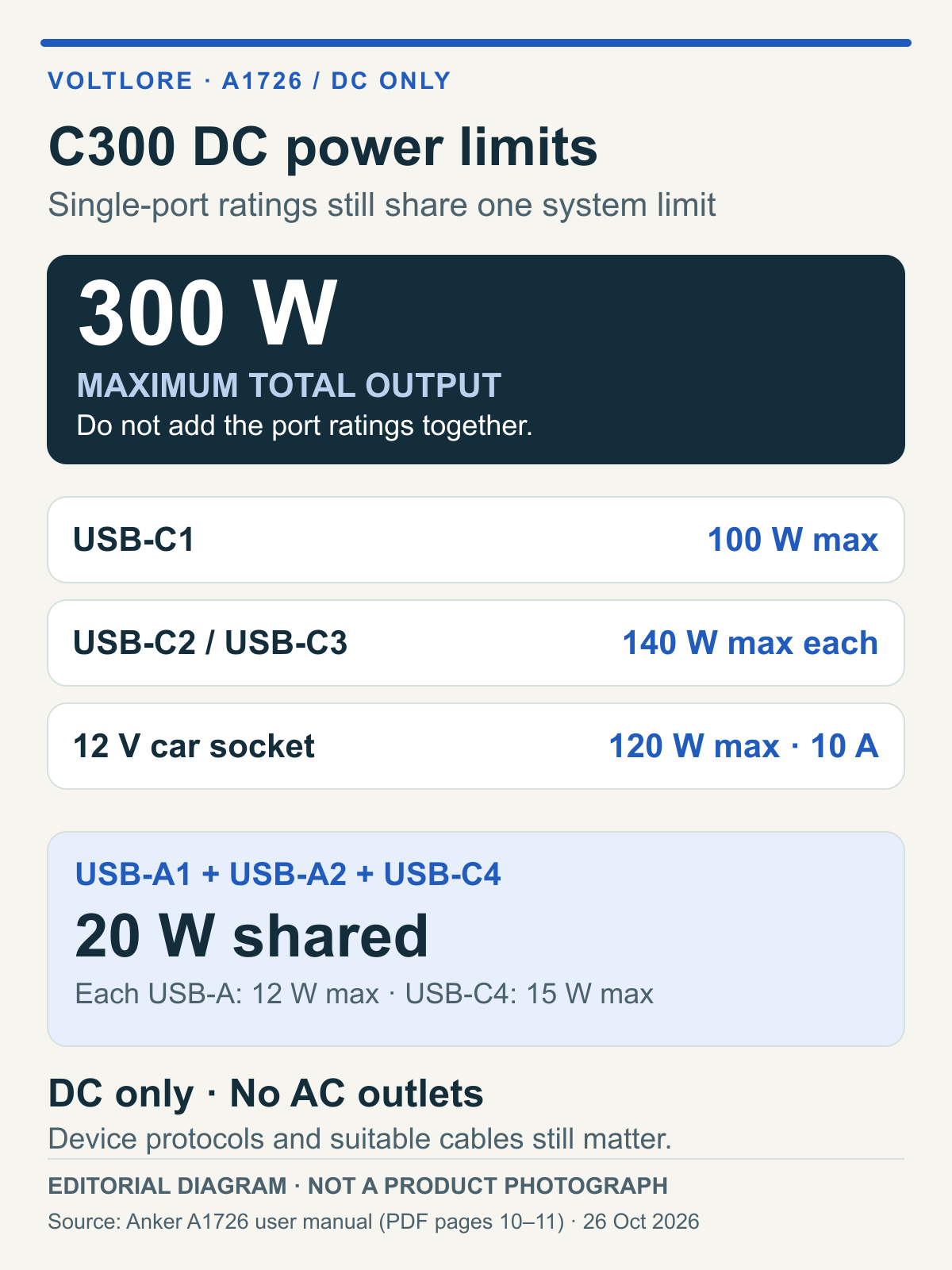
On this page
Quick answer: The Anker SOLIX C300 DC A1726 has a manufacturer-rated nominal capacity of 288 Wh and a 300 W maximum total output. Its four USB-C ports and 12 V car socket suit compatible USB/DC devices. It has no AC outlets. The capacity figure is not a promise that 288 Wh will reach your equipment after conversion losses.
This is a research-based buying guide using official specifications, not a hands-on product or runtime test.
Where to buy
- For USB-C and 12 V loads within the documented limitsAnker SOLIX C300 DC A1726See on AmazonPaid link
Who it suits and who should skip it
Shortlist the C300 DC if your camping or work setup already runs on compatible USB-C devices and DC accessories, and you value several USB-C connections, an extendable light and app connectivity. Those features are documented on Anker's US product page; they do not prove that every connected device can charge at its maximum rate simultaneously.
Skip this model for equipment that requires an AC wall outlet. For a coffee maker, blender or another AC appliance, first check its required continuous and starting power, then choose an AC power station rated for that load. Simply switching to the C300 AC&DC because it has an AC socket does not establish that it can run the appliance.
The A1726 manual lists a weight of 2.8 kg. If carrying weight matters more than extra ports, app features or lighting, compare the 2.58 kg EcoFlow TRAIL 300 DC below. These are listed weights, not our measurements.
Key choices
Anker SOLIX C300 DC A1726: four USB-C ports, with shared limits
Who it's for: A USB/DC setup that benefits from several charging connections, integrated lighting and app access without requiring an AC outlet.
| Feature | Manufacturer-listed specification |
|---|---|
| Nominal capacity | 288 Wh |
| Maximum total output | 300 W |
| USB-C1 | Output up to 100 W |
| USB-C2 / USB-C3 | Input/output up to 140 W each |
| USB-C4 | Output up to 15 W |
| USB-A1 / USB-A2 | Output up to 12 W each |
| Shared small-port limit | USB-A1 + USB-A2 + USB-C4: 20 W combined |
| Car socket | 12 V / 10 A, up to 120 W |
| Listed weight | 2.8 kg |
| Solar input | XT60, 11–28 V, up to 100 W |
Source: Anker A1726 user manual, specification pages.

Original editorial diagram, not a product photograph or load test. Ratings are manufacturer limits, not simultaneous guaranteed outputs.
The useful distinction is the system limit versus the port limit. Adding the printed port maxima does not increase the 300 W total ceiling. The two USB-A ports and USB-C4 also share their own 20 W allowance. Check both constraints when assigning devices.
Some multiport-allocation rows in the manual appear inconsistent with the stated total ceiling. We therefore do not reproduce that table or infer port priorities. This guide does not promise a particular simultaneous allocation for every combination of devices.
Charging, upkeep and accessories
For first use, Anker's US FAQ describes a USB-C activation method: connect USB-C2 or USB-C3 to a PD charger supplying at least 18 W at 9 V or higher. This identifies the documented USB-C method, rather than claiming it is the only possible activation route. For ordinary charging, Anker recommends a PD charger of at least 30 W.
The manual lists combined USB-C2/C3 input up to 280 W. That is an input rating, separate from the 300 W output ceiling. High-power charging requires suitable PD chargers, devices and cables; the documented 100 W and 140 W conditions require 5 A cables.
The US package includes a USB-C cable, but not a wall charger; the shoulder strap is sold separately. Include any required charger, cable or solar accessory in your buying decision rather than comparing the power station alone.
For solar input, check the XT60 connection, 11–28 V range and 100 W maximum together. A panel's advertised wattage alone is not a compatibility check or a promise of continuous charging power. The US FAQ lists PS30 / 5 V 3 A USB-C panels, PS200 and PS400 as incompatible.
One work-session calculation, with explicit assumptions
A useful estimate separates stored energy from power draw:
Estimated hours = nominal capacity (Wh) × assumed delivered-energy fraction ÷ total load (W).
For illustration only, assume 80% of the rated 288 Wh reaches already-compatible USB/DC loads, and assume a steady 45 W laptop, 10 W router and 5 W light. The total hypothetical load is 60 W.
288 Wh × 0.80 ÷ 60 W = 3.84 hours, or about 3 hours 50 minutes.
The 80% factor and all three device loads are editorial assumptions, not Anker specifications or our measurements. The nominal capacity comes from Anker's product information. Actual runtime varies with device draw, conversion losses, standby consumption and temperature.
A router is not automatically suitable for direct connection to the 12 V socket. Check its required voltage, polarity and connector, plus any necessary adapter or converter and cable ratings. The example assumes compatibility; it does not establish it for a particular router, laptop or light.

Original editorial calculation diagram, not a product photograph or runtime test. The 80% delivery factor and the 45 W laptop, 10 W router and 5 W light are hypothetical inputs.
Pros and cons
Potential strengths: Four USB-C connections offer flexibility for a USB/DC setup. The extendable light and app provide features absent from the TRAIL 300 DC comparison below. Dual USB-C input supports a documented combined maximum of 280 W when the charging equipment meets the requirements.
Tradeoffs: There is no AC outlet, and the 300 W system ceiling and shared 20 W group constrain simultaneous use. The wall charger and shoulder strap add to the accessory decision. Listed port ratings and capacity do not establish measured charging speed or runtime.
Alternatives
The EcoFlow TRAIL 300 DC is a relevant alternative; this comparison excludes TRAIL 200 and TRAIL Plus 300. The figures below come from EcoFlow's official US variant table and the Anker A1726 manual.
| Decision point | Anker C300 DC A1726 | EcoFlow TRAIL 300 DC | Practical implication |
|---|---|---|---|
| Nominal capacity / total output | 288 Wh / 300 W | 288 Wh / 300 W | These headline ratings do not identify a runtime winner |
| USB-C connections | Four: 100 W, 140 W, 140 W, 15 W maxima | Two: up to 140 W each | Anker offers more USB-C connections; shared limits still apply |
| Listed weight | 2.8 kg | 2.58 kg | EcoFlow's listed weight is 0.22 kg lower |
| App and light | App connectivity; extendable light | No Wi-Fi, Bluetooth, app or built-in light | Decide whether these features are worth carrying |
| Listed solar input | Up to 100 W; XT60, 11–28 V | Solar/car input up to 110 W | Compare the electrical requirements, not just the wattage |
Our buying judgment: Shortlist C300 DC for the extra USB-C connections, light and app. Compare TRAIL 300 DC if two USB-C ports meet your needs and the lower listed weight matters more. This is a feature-based judgment, not evidence that either product lasts longer, charges faster or is more durable.
Where to buy the correct version
Use the official Anker C300 DC product page to check the US model and package. The Amazon purchase button below targets the C300 DC listing associated with ASIN B0D62PMB3R.
See on Amazon(Paid link)
Before ordering, confirm the selected C300 DC version, included accessories, seller and delivery conditions. Do not substitute C300 AC, C300X DC or another bundle without checking its specifications. These links are not a price, stock or delivery guarantee.
FAQ
Can the Anker SOLIX C300 DC power an AC appliance?
No AC outlet is provided. Choose an appropriately rated AC power station for equipment that needs one; the presence of an AC socket alone does not establish that an appliance's continuous and starting power requirements are covered.
How do I charge the Anker SOLIX C300 DC?
Use USB-C2 or USB-C3 for the documented USB-C charging route. The first-use PD conditions, everyday charger recommendation and cable requirements are collected in the charging section above.
Does C300 DC USB-C charging support 140 W?
USB-C2 and USB-C3 each support input/output up to 140 W with appropriate PD equipment and 5 A cables. The rating is not a promise that every connected device will draw 140 W.
How long will a C300 DC run my devices?
Estimate from the load and an explicitly assumed delivered-energy fraction, as shown above. Our 3.84-hour example is not a measured runtime or a guarantee for your equipment.
How we researched
We reviewed the official Anker product page, A1726 manual and EcoFlow TRAIL comparison, checked October 26, 2026. We did not handle the products, measure runtime, test charging speed or verify all simultaneous-port combinations.
The two illustrations are original editorial diagrams based on documented ratings and a separately labeled calculation. They illustrate published ratings and an explicitly hypothetical calculation. We have not purchased or physically tested the products.
Further reading
For a broader backup plan, see our portable power station versus gas generator guide. If your essential devices need AC outlets, use our Anker SOLIX C1000 Gen 2 guide as a starting point for checking the load and capacity requirements.
Sources
More from VoltLore
EcoFlow DELTA Pro 3: Build an Essentials Backup Plan Before Buying
Plan the DELTA Pro 3 around essential loads: 4,096Wh capacity, AC operating modes, a 115 lb transport route, recharge and qualified home integration.
EcoFlow 220W Bifacial Panel: Check the Generation and Solar Input
Verify the EcoFlow 220W bifacial panel generation, electrical input match, charging cable and sunny placement before planning energy yield.
Anker SOLIX C2000 Gen 2: Is a 2kWh Backup Worth the Weight?
A 2,048Wh battery can make an essentials-only outage plan practical. We examine the C2000 Gen 2's charging conditions, carrying weight and output limits before you buy.