
Portable Power Station for Camping: DJI 1000 V2 vs Jackery 1000 v2
This comparison distinguishes the DJI Power 1000 V2's high continuous AC output from the Jackery Explorer 1000 v2's lighter carrying weight. It clarifies that capacity in watt-hours differs from power in watts, helping campers match devices to the correct unit.
Verdict: Choosing a portable power station for camping starts with your equipment. Choose the DJI Power 1000 V2 for more continuous AC output and two high-power USB-C ports. Choose the Jackery Explorer 1000 v2 for similar nominal energy in a lighter unit, with a built-in 12V accessory output. Neither specification sheet establishes a runtime winner.
VoltLore earns a commission from qualifying purchases made through links marked “Paid link”, at no extra cost to you. As an Amazon Associate, VoltLore earns from qualifying purchases.
Images in this story
Image 1 of 3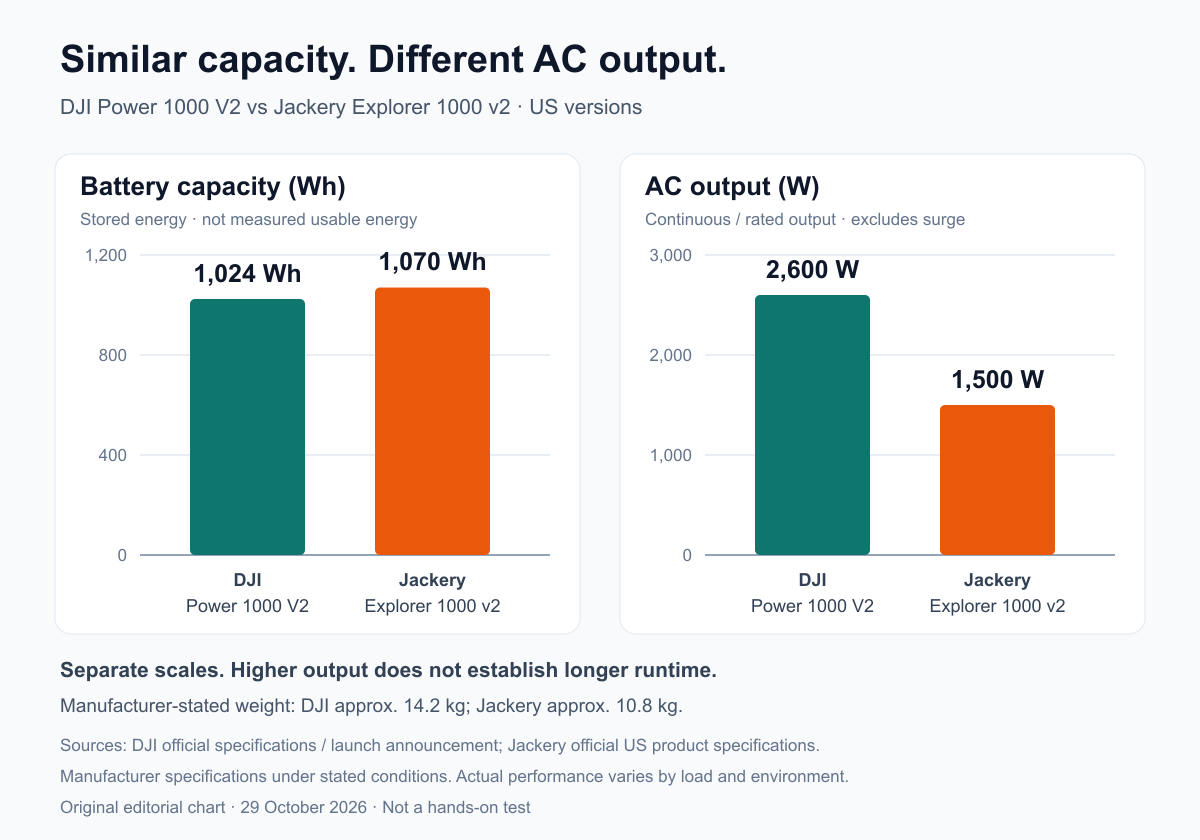
On this page
Verdict: Choosing a portable power station for camping starts with your equipment. Choose the DJI Power 1000 V2 for more continuous AC output and two high-power USB-C ports. Choose the Jackery Explorer 1000 v2 for similar nominal energy in a lighter unit, with a built-in 12V accessory output. Neither specification sheet establishes a runtime winner.
Affiliate disclosure: As an Amazon Associate, VoltLore earns from qualifying purchases. The Amazon links below use our affiliate tracking ID.
Our top picks
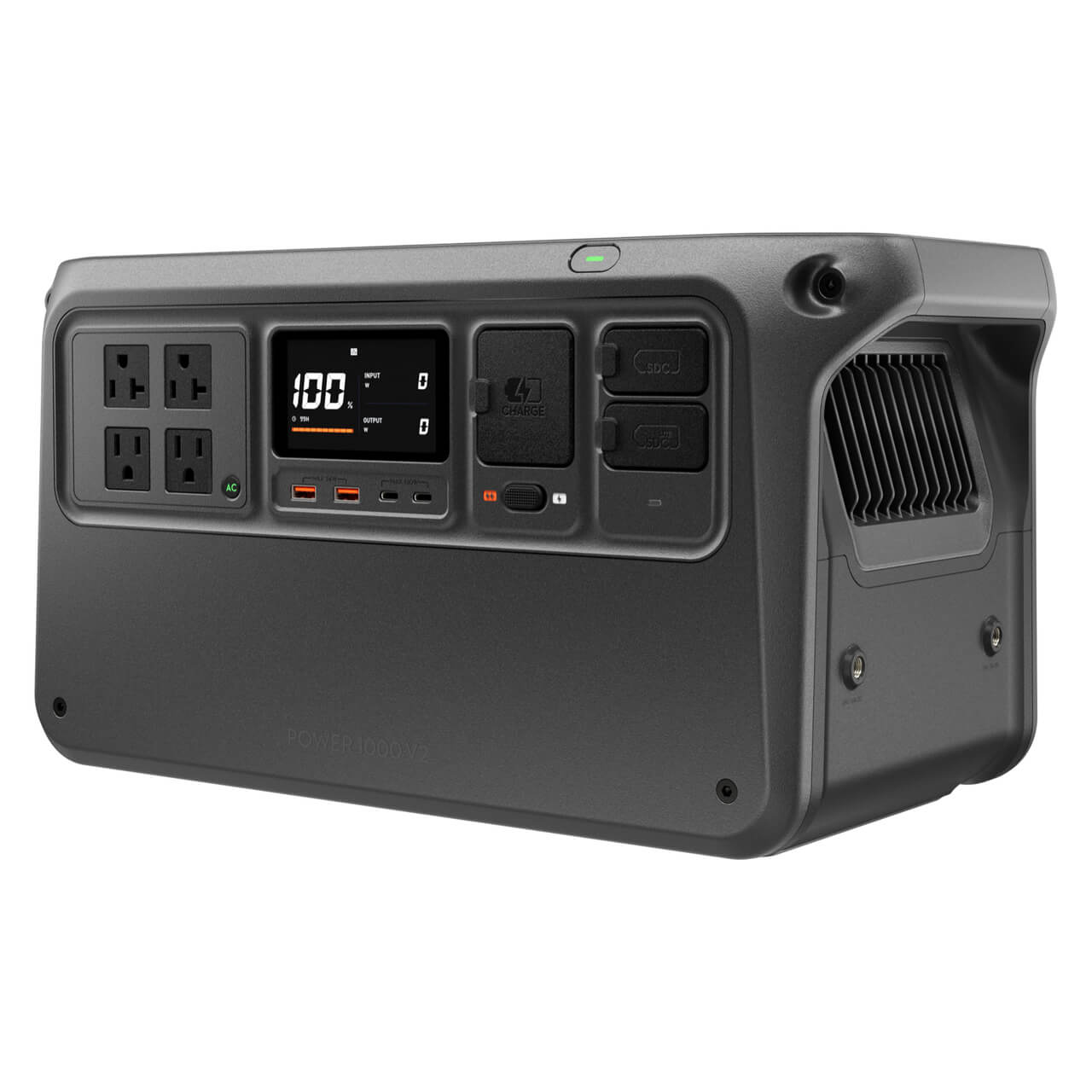 Best for higher continuous AC outputDJI Power 1000 V2Image: DJI. Official US product image fromSee on AmazonPaid link
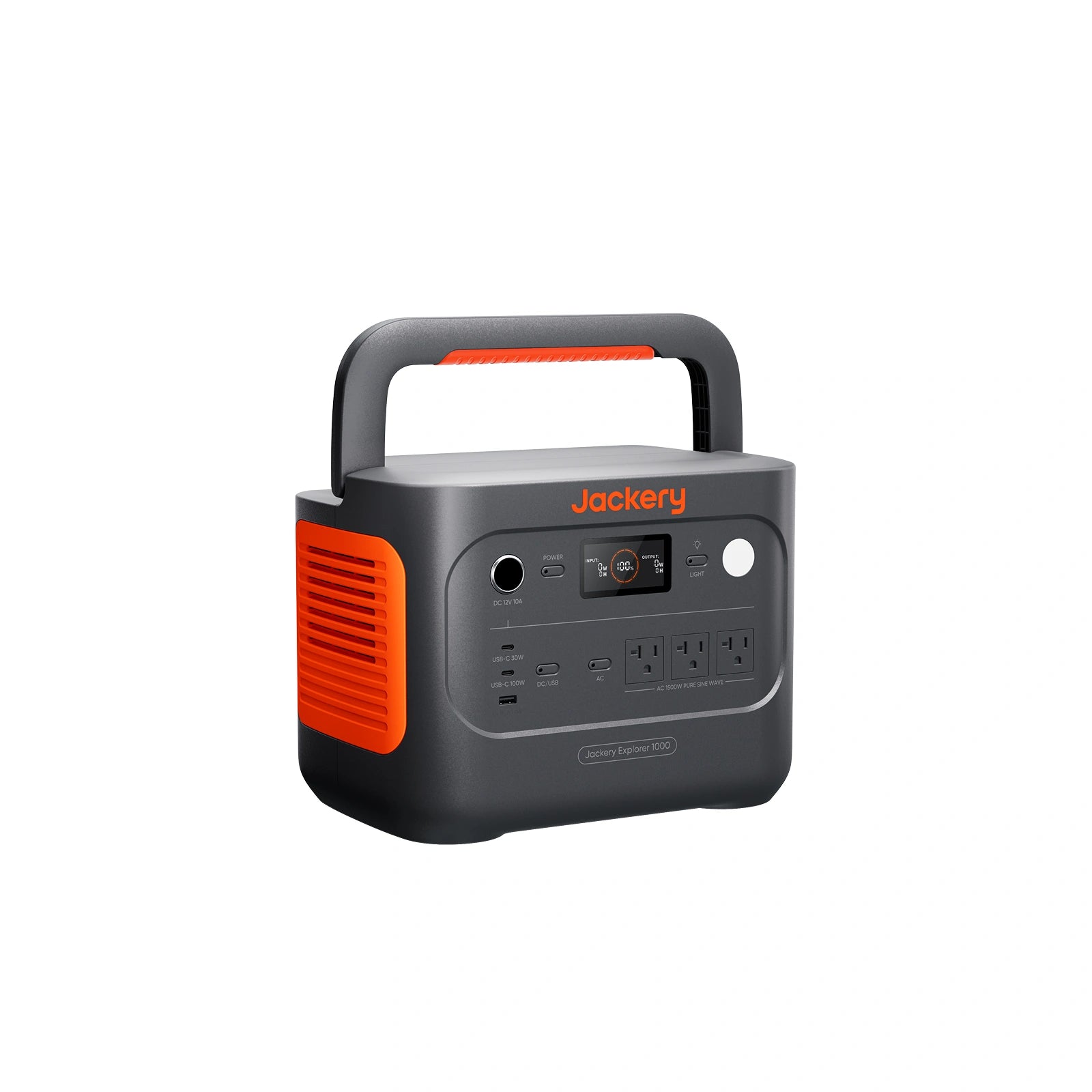 Best for lower carrying weight and direct 12V outputJackery Explorer 1000 v2Image: Jackery. Official US brand image fromSee on AmazonPaid link
Side-by-side comparison
These are manufacturer specifications for US versions, not our measurements. DJI's output figure comes from its official launch announcement; the remaining specifications are documented by DJI and Jackery.
| Feature | DJI Power 1000 V2 | Jackery Explorer 1000 v2 |
|---|---|---|
| Nominal capacity | 1,024 Wh | 1,070 Wh |
| Continuous / rated AC output | 2,600 W stated continuous | 1,500 W rated |
| Approximate weight | 14.2 kg | 10.8 kg |
| Battery chemistry | LFP | LiFePO4 / LFP |
| Manufacturer cycle claim | Over 80% capacity after 4,000 cycles | At least 70% after 4,000 cycles |
| USB-C output | Two ports, up to 140 W each | One up to 100 W; one up to 30 W |
| US AC outlets | Four | Three |
| Built-in 12V accessory socket | No; compatible SDC output accessory needed | Yes, 12V / 10A |

Original chart based on manufacturer specifications. Capacity and AC output use separate zero-based scales; higher output does not establish longer runtime.
Choosing a portable power station for camping
DJI Power 1000 V2: For Higher-Output Equipment

Official DJI product image, US version. This is not a photograph from our own testing; additional accessories are sold separately.
DJI is the stronger candidate when a planned load exceeds Jackery's 1,500 W continuous rating but fits DJI's stated 2,600 W limit. Add simultaneous running loads and check startup requirements separately. Four outlets do not each provide 2,600 W.
For laptop-heavy trips, DJI's two 140 W USB-C outputs may reduce dependence on AC adapters. Reaching 140 W requires a compatible PD 3.1 device and EPR-capable cable; a lower-power laptop will not automatically charge faster. DJI specifications
Check the DJI Power 1000 V2 single unit on Amazon (Paid link).
See on Amazon (Paid link)
Jackery Explorer 1000 v2: For Frequent Carrying

Official Jackery product image, black US version. Solar panels are not pictured or assumed to be included.
Jackery's stated weight is about 3.4 kg lower. For repeated car-to-campsite trips, that difference may matter more than output headroom your equipment never uses. This is an editorial judgment from the specifications, not a carrying test.
Its built-in 12V / 10A socket powers compatible accessories; it is an output, not the input used to recharge the station from a vehicle. Vehicle recharging uses a suitable cable connected to a DC8020 input. USB-C input charging is unsupported. Jackery FAQ
Check the black Jackery Explorer 1000 v2 single unit on Amazon (Paid link).
See on Amazon (Paid link)
Match the station to the trip
| Your planned use | Editorial starting point |
|---|---|
| Mostly phones, lights and one laptop | Check required energy first; unused AC headroom adds little |
| Frequent lifting with modest loads | Consider Jackery's lower stated weight |
| A necessary load above 1,500 W | Investigate DJI's output compatibility, then startup demand |
| A compatible 12V camping accessory | Jackery offers a direct socket; price DJI's required cable |
| Intermittent AC refrigerator | Check operating settings and measured demand before departure |
DJI's manual describes a continuous-AC setting for intermittent appliances such as refrigerators, alongside adjustable timeout settings. Configure and verify this with your actual load before relying on it overnight. DJI manual, page 10
Differences and limits
Jackery's nominal capacity is only 46 Wh higher. That arithmetic does not establish a meaningful runtime advantage: conversion losses, inverter consumption, temperature and appliance cycling affect delivered energy. For planning, use runtime hours ≈ usable delivered Wh ÷ average load W. The usable-energy input must be measured or credibly documented; do not substitute the advertised AC-output rating.
The two 4,000-cycle claims also use different remaining-capacity thresholds. They do not establish equal service life, a guaranteed number of camping seasons, or lower ownership cost. DJI additionally specifies laboratory charging and discharging conditions for its claim. DJI specifications, Jackery specifications
Before you buy: budget for the complete setup
Compare station + required cables/adapters + solar panels, if needed + delivery and tax. DJI's SDC drone cables, vehicle-charging hardware and solar accessories generally require separate purchase. Jackery's standard accessory list includes an AC cable; do not assume a car-charging cable or solar panels come with the single-unit listing. DJI accessories manual, Jackery package information
Check the selected Amazon bundle, seller, return terms and warranty eligibility. Prices change, so this comparison does not claim a fixed saving. For grid recharging, cost equals wall-energy consumption in kWh multiplied by your electricity tariff; battery capacity alone omits charging losses.
Before departure, confirm running and startup loads, connector compatibility, ventilation and charging-temperature limits. Storage and discharge temperature ranges are not charging permissions.
FAQ
Does 2,600 W mean longer runtime?
No. Watts describe output power; watt-hours describe stored energy. A larger load can consume a similar-sized battery faster.
Can either replace a zero-interruption UPS?
Do not assume so. DJI's manual excludes zero-millisecond UPS use, and Jackery's FAQ describes a nonzero transfer interval. Battery-mode ratings should not be treated as bypass-mode limits. DJI manual, page 17, Jackery UPS guidance
How we researched
We checked official specifications, operating instructions and US single-unit Amazon listings on October 29, 2026. This is a research comparison: we did not measure runtime, noise, charging speed or durability. Recommendations reflect documented tradeoffs, not a hands-on winner.
Sources
More from VoltLore
Portable power station for home backup: plan for days
Size a backup battery around essential loads and a realistic recharge plan, then compare a compact and an expandable station by their listed specifications.
Anker SOLIX C1000 portable power station: Gen 2 backup
Anker SOLIX C1000 portable power station, Gen 2: assess 1,024Wh capacity, 2,000W output, carrying weight and expansion limits for essential backup.
EcoFlow DELTA Pro portable power station: original 3,600Wh
EcoFlow DELTA Pro portable power station: assess the original 3,600Wh, 3,600W, 120V model, its 99lb weight and when to compare DELTA Pro 3.